Designing for the Dynamic Island
5 January 2026
The Dynamic Island is one of the more interesting design canvases Apple has introduced in recent memory. Apple needed to work around the TrueDepth camera cutout on newer iPhones, so instead of treating it as dead space, they instead turned the cutout into an interactive surface.
Over the holidays, I wanted to better understand the design constraints involved with building something for the Dynamic Island. I started by recreating Apple's existing patterns, then tried applying the same principles to live sports scores.
Recreating Apple's patterns
The Dynamic Island, in a nutshell, is the black pill surrounding the front camera on newer iPhones. It expands and contracts to surface live information (timers, calls, music playback) without requiring you to open an app.
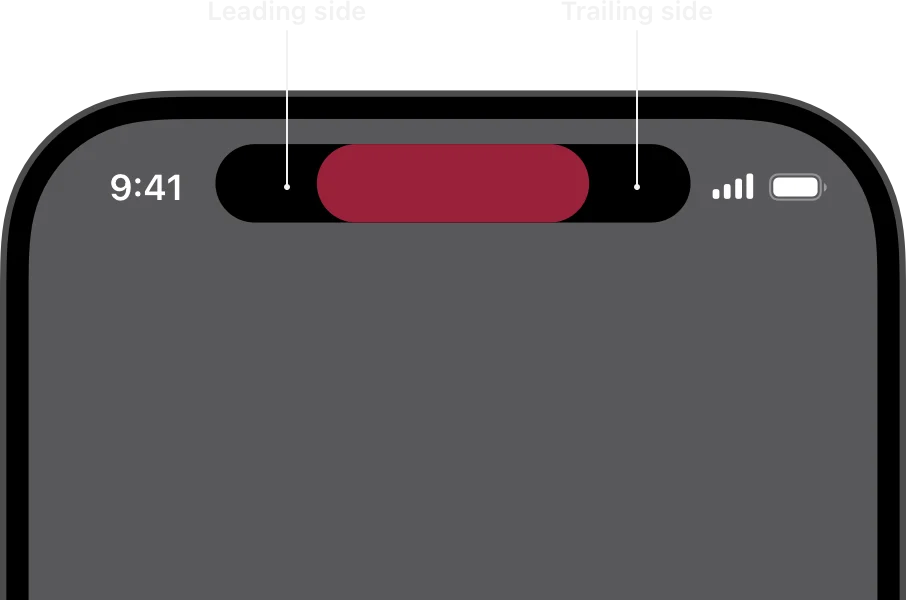
The leading and trailing content areas of the Dynamic Island, from Apple's Human Interface Guidelines
Functionally, you have about 52 × 37 points on each side of the camera in the compact view. Expanded, you get up to 160 points of height. The question that this brings up for a designer in this situation is fairly straightforward: what information is truly essential at a glance, and what information is fine to be hidden behind a tap?
Sorry! This component was built for a larger screen, and is only displayed on screen sizes larger than 390px.Toggle between states to see the idle pill, the ring/silent switch animation, and a countdown timer
I recreated three of Apple's native behaviors: idle, ring, and timer. The idle state is the black pill: it reads as hardware. The ring mode shows the ringer toggle with a bell icon. The timer shows a circular progress indicator when compact, full playback controls when expanded.
What's consistent: the compact state shows only critical information. Time remaining, call status. The expanded state reveals controls and context.
Football: "who's winning?"
Sorry! This component was built for a larger screen, and is only displayed on screen sizes larger than 390px.Compact view shows team crests and score; tap to expand for match time and an event timeline
Football has a lot of information. Score, teams, match time, competition, goals, cards. At a glance, what matters?
The compact view shows team crests, and the current score. No timer, no names, no event history. This, for what it's worth, is what Apple currently does with the Apple Sports app as well.
The expanded view is where I've diverged a bit from what the Apple Sports app does. This adds the league/competition and a live timer at the top, the score with team abbreviations, and a progress bar of sorts with event markers. Goals and cards are positioned on the timeline, with progress bar compressing match state, events, and game shape into one element.
Cricket: what’s needed to win?
Sorry! This component was built for a larger screen, and is only displayed on screen sizes larger than 390px.Compact view shows the current score and target; expanded view adds more context
Cricket arguably involves even more information, and therefore is a harder problem to solve. Two innings per team, wickets and runs, overs instead of a clock, multiple active batsmen. Same pixel budget, more information.
My compact view shows the batting team's logo, current score in wickets-runs format (only because the example I picked was from this year's Ashes), and the chase target. You'll notice the bowling team doesn't appear at all. In a chase scenario, only three things matter: the score, the target, and who's batting. So that's what fits.
The expanded view gives us more information, but still relies on icons to convey information succinctly. A cricket bat next to a bastman's name indicates that they're on strike instead of spelling it out. The first innings' scores appear at reduced opacity and text size, providing context without demanding attention. What's required to win is shown in red for urgency. No bowler stats, no fielding positions, no extras breakdown. The frame narrows entirely to the batting team's chase, which makes it possible to fit what's essential.
The one question
The key takeaway here: constrained spaces force clarity. What does the user need to know right now? In the compact view, you answer one question. In the expanded view, maybe three or four.
Everything else waits.